How to Generate a Strong Random Password Online
Creating a strong password is one of the simplest ways to protect your online accounts. Whether you use email, social media, online banking, or business applications, a secure password helps reduce the risk of unauthorized access. However, creating a password that is both strong and difficult to guess can be challenging, especially when you need separate passwords for multiple accounts.
A random password generator online makes this process easier. It creates passwords using a combination of letters, numbers, and special characters. Depending on your needs, you can also choose the password length and select which types of characters to include.
In this guide, you will learn how to generate a strong random password online, what makes a password secure, how to choose the right password length, and how to protect your passwords after creating them.
What Is a Random Password Generator?
A random password generator is a tool that automatically creates passwords using selected characters. Instead of asking you to think of a password yourself, it generates a combination of characters designed to be difficult to predict.
Most online password generators allow you to customize the password according to your security requirements. You can usually select uppercase letters, lowercase letters, numbers, and special characters.
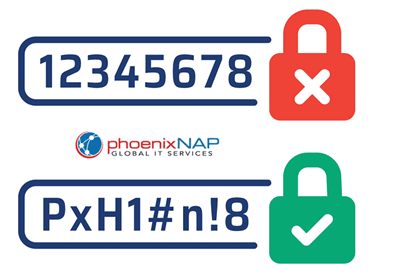
For example, a password generator might create a password such as:
T8v!qR4#zM2@pL7x
This example demonstrates a mixture of character types. It is provided only as an illustration and should not be used as a real account password.
Random password generators can help you avoid common passwords, predictable patterns, and personal information that attackers might discover.
However, the quality of a generated password depends on how the tool creates random values. A reliable generator should use a cryptographically secure random number generator rather than a predictable process.
Why Should You Generate a Strong Random Password Online?
Many people create passwords using familiar words, birthdays, names, or simple number combinations. Although these passwords may be easy to remember, they can also be easier for attackers to guess.
A strong random password offers several important benefits.
Better protection against guessing
Attackers often use automated tools to test common passwords and predictable combinations. A sufficiently long, randomly generated password makes this process more difficult.
Reduced risk from password reuse
Using the same password across several websites creates a security risk. If one website suffers a data breach, attackers may try the exposed password on other services.
A password generator helps you create a different password for each account.
Less reliance on personal information
Passwords based on names, birthdays, phone numbers, or familiar phrases may reveal information that others can discover. Randomly generated passwords avoid these predictable choices.
Improved account security
A unique password for each account helps limit the damage if one password becomes exposed. It does not eliminate every security risk, but it is an important part of protecting your digital identity.
How to Generate a Strong Random Password Online
Generating a secure password usually takes only a few steps. The following process can help you choose appropriate settings and create a password that meets your security needs.
Step 1: Choose a Reliable Password Generator
Start by selecting an online random password generator that explains how it creates passwords.
Security is especially important because passwords protect sensitive information. Whenever possible, choose a tool that generates passwords directly in your browser using a cryptographically secure random number generator.
A browser based generator can reduce the need to send your password to a remote server. However, you should verify how the specific tool operates rather than assume every online generator works this way.
Avoid tools that require unnecessary personal information, request your existing passwords, or ask you to create an account simply to generate a password.
Step 2: Select the Password Length
Password length is one of the most important factors affecting password strength.
A longer password generally provides more possible combinations, making it harder to guess when it is generated randomly.
For most personal accounts, a randomly generated password of at least 16 characters is a practical starting point. You can choose a longer password when the service supports it.
For example, consider the following lengths:
A password containing 8 random characters has fewer possible combinations than one containing 12 characters.
A password containing 12 random characters has fewer possible combinations than one containing 16 characters, assuming both use the same character set.
The more possible combinations an attacker must test, the more difficult exhaustive guessing becomes.
Some websites impose password length limits. If a service supports longer passwords, consider using that option instead of choosing a shorter password for convenience.
Step 3: Choose the Character Types
Most password generators allow you to select the characters included in your password.
Common options include:
Uppercase letters: These include letters from A to Z.
Lowercase letters: These include letters from a to z.
Numbers: These include digits from 0 to 9.
Special characters: These include symbols such as exclamation marks, percentage signs, and number signs.
Using a larger character set increases the number of possible combinations for a password of the same length.
For example, a randomly generated password using uppercase letters, lowercase letters, and numbers has more possible combinations than one using lowercase letters alone.
Including special characters can expand the available combinations further.
However, check the requirements of the website where you intend to use the password. Some services restrict particular symbols or impose other password rules.
If special characters are not accepted, you can still create a strong password by increasing its length and using a sufficiently large selection of permitted characters.
Step 4: Generate the Password
After choosing the length and character types, use the generator to create a password.
Review the result to confirm that it meets the account requirements. If the password is too short or does not include the required character types, adjust the settings and generate another one.
Avoid manually replacing random characters with familiar words, birthdays, or predictable patterns. These changes can make a password easier to guess.
If you generate several passwords, use a different one for each account.
Step 5: Copy and Store the Password Securely
Once you have generated a suitable password, save it in a secure location.
Read also: 10 Free Website SEO Audit Tools for Beginners
A reputable password manager is usually the most convenient option because it can store unique passwords and help fill them into websites and applications.
If you do not use a password manager, avoid storing passwords in unprotected documents, plain text notes, or messages that others might access.
Before copying a password from an online tool, consider whether the tool stores or transmits the generated value. For sensitive accounts, a trusted password manager with a built in generator or a reputable local generation tool may be a better choice.
After saving the password, sign in to the relevant account and confirm that the new password works.
What Makes a Random Password Strong?
A strong password is difficult to guess and provides enough possible combinations to resist automated attacks.
Several factors determine its strength.
Password Length
Long passwords generally offer better protection than short passwords when both are generated using a secure random process.
For example, a randomly generated password with 20 characters will generally offer more resistance to guessing than one with 10 characters when both use the same character set.
Length is particularly valuable because each additional random character expands the number of possible combinations.
Randomness
A password should not follow an obvious pattern.
Examples of weak patterns include consecutive numbers, repeated characters, keyboard sequences, and common words followed by simple digits.
A password generator should select characters unpredictably using a suitable random number generator.
A password that looks complicated is not necessarily secure if its characters follow a predictable pattern.
Uniqueness
Every important online account should have its own password.
Using a unique password prevents one exposed password from automatically giving an attacker access to other accounts that use the same credentials.
This is particularly important for email accounts, financial services, cloud storage, and accounts used to reset other passwords.
Resistance to Personal Guessing
Avoid using personal details such as your name, birthday, phone number, address, or the name of a family member.
These details may be available through social media, public records, or information shared with other people.
A randomly generated password does not depend on these personal details, making it less predictable.
How Long Should a Random Password Be?
The appropriate password length depends on the account, the service requirements, and how the password is generated.
For general personal accounts, 16 characters is a reasonable starting point for a randomly generated password. Longer passwords can provide additional protection when the service supports them.
For highly sensitive accounts, such as primary email or financial accounts, use a long, unique password and enable multifactor authentication.
If a website limits password length, follow its requirements while choosing the strongest supported option.
Password length should also be considered alongside randomness. A long password made from a predictable phrase may be less secure than a shorter password generated uniformly from a large character set.
When you need a password that is easier to remember and must enter manually, a long passphrase made from randomly selected words can be a useful alternative. A passphrase should contain enough randomly selected words to resist guessing.
Are Online Random Password Generators Safe?
Online password generators can be useful, but their safety depends on how they work.
A reputable generator should use a cryptographically secure random number generator and explain whether passwords are processed locally or sent to a server.
Browser based generation can offer a privacy advantage when the password is created entirely on your device and is not transmitted elsewhere.
However, the fact that a tool runs in a browser does not automatically prove that it is secure. A website could still collect information or use unsafe code.
Before using an online generator, consider these precautions:
Choose a tool that clearly explains its security practices.
Avoid tools that ask for an existing password or unnecessary personal details.
For sensitive accounts, consider generating passwords directly in a trusted password manager.
Keep your browser and device updated to reduce exposure to known security vulnerabilities.
Never share your generated passwords with other people.
If you are unsure whether an online tool protects your password, choose a trusted alternative rather than risking the security of an important account.
Best Practices for Managing Random Passwords
Generating a strong password is only one part of account security. How you store and use it also matters.
Use a unique password for every account. This limits the impact of a data breach involving one service.
Consider using a reputable password manager to store passwords securely and generate new ones when needed.
Enable multifactor authentication whenever a service offers it. This adds another layer of protection beyond your password.
Never share passwords through unsecured messages or public documents.
Change a password promptly if you discover that it has been exposed, reused after a breach, or accessed by someone without permission. Routine password changes are generally unnecessary when a password remains strong, unique, and uncompromised, unless the service requires them.
For important accounts, use additional security features such as passkeys where supported. These can reduce reliance on traditional passwords.
Finally, protect the email account you use to recover other accounts. If someone gains access to that email account, they may be able to reset passwords elsewhere.
Frequently Asked Questions
1. What is the best way to generate a strong random password online?
Choose a reputable generator that uses a cryptographically secure random number generator. Select a suitable length, preferably at least 16 characters for general personal accounts, and include a broad range of permitted characters.
2. How many characters should a strong password have?
A randomly generated password of 16 characters is a practical starting point for many accounts. Longer passwords can provide additional protection, provided the website supports them.
3. Are random password generators free to use?
Many password generators are available without payment. However, features and security practices vary. Review how a tool generates and handles passwords before using it.
4. Is it safe to use an online password generator?
It can be safe when the tool uses secure randomness and protects your privacy. For sensitive accounts, consider a trusted password manager or a generator that creates passwords locally on your device.
5. Should I use special characters in my password?
Special characters can increase the number of possible combinations. However, password length and randomness are also important. If a website restricts symbols, use a longer random password with the characters it permits.
6. Should I use the same generated password for multiple accounts?
No. Each account should have a unique password. If one password becomes exposed, unique passwords help prevent attackers from using it to access your other accounts. A password manager can make it easier to manage them securely.