Best Free QR Code Generator Without Signup
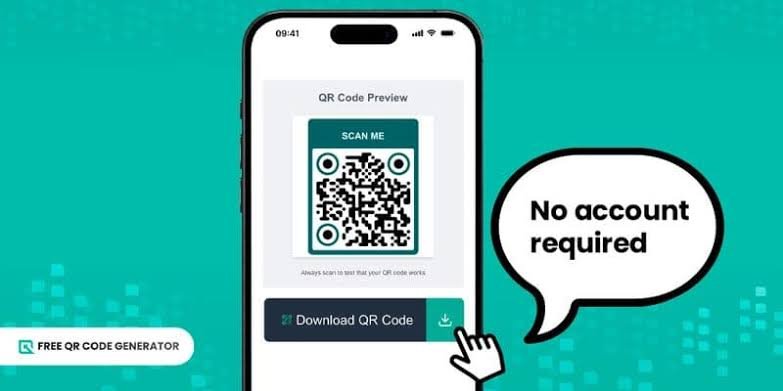
A free QR code generator without signup lets you create a QR code quickly without creating an account, providing personal information, or going through a registration process. You can use it to share website links, contact details, WiFi access, business information, product pages, and other digital content.
For individuals, small businesses, students, and marketers, a QR code generator without registration offers a simple way to connect printed materials with digital information. You can create a code, download the image, and use it on business cards, flyers, posters, packaging, menus, or other materials.
However, not every free QR code generator offers the same features. Some tools create static QR codes that work without an ongoing subscription, while others offer dynamic QR codes that require a paid plan for editing links or tracking scans. Some generators also request an email address or account before allowing downloads.
This guide explains how to choose the best free QR code generator without signup, which features to look for, how to create a QR code, and what to consider before using one for personal or business purposes.
What Is a Free QR Code Generator Without Signup?
A free QR code generator without signup is an online tool that creates QR codes without requiring users to register or log in.
A QR code is a type of barcode that stores information in a pattern of black and white squares. When someone scans it with a compatible smartphone camera or QR code reader, the device can display the information or open the relevant content.
Depending on the generator, you can create QR codes for different purposes, including:
- Website URLs and landing pages
- WiFi network names and passwords
- Email addresses and phone numbers
- Plain text and messages
- Business contact information
- Social media profiles
- Digital menus and product pages
The main advantage of a no signup QR code generator is convenience. You can create a code immediately without remembering another password or sharing your email address.
For occasional use, this approach is often sufficient. However, you should check whether the tool creates a permanent static QR code or a dynamic code that depends on an external service.
Best Free QR Code Generator Without Signup: Features to Look For
Choosing the right QR code generator depends on how you plan to use the code. A simple tool may be enough for a website link, while business materials may require better design options and reliable downloads.
1. No Registration Required
The first requirement is that the generator should work without an account.
You should be able to enter your information, generate the QR code, preview it, and download the image without submitting an email address.
A tool that allows free generation but requires registration before downloading does not fully meet this requirement.
Check the complete process before spending time customizing your QR code.
2. Free Static QR Codes
A static QR code stores the information directly in the code itself. For example, a static QR code for a website contains the destination URL.
When someone scans it, their device reads the stored information and opens the corresponding page.
Static QR codes are suitable for business cards, printed menus, event invitations, posters, and personal projects.
They generally do not require a paid subscription to keep working. However, the destination website must remain available, and the QR code must remain readable.
A static QR code cannot normally change its stored destination after creation. If you need to update the destination, you must generate and distribute a new code.
3. Multiple QR Code Types
A useful free QR code generator should support the information you want to share.
Website QR codes are among the most common options. They help users access websites without typing long addresses.
WiFi QR codes allow people to connect to a compatible wireless network by scanning a code instead of manually entering network details.
Text QR codes display a written message. Contact QR codes can store information such as a person’s name, telephone number, email address, and other contact details.
Some tools also support email links, telephone numbers, social media profiles, and event information.
Before choosing a generator, confirm that it supports your intended QR code type without requiring an upgrade.
4. High Quality Downloads
A QR code must remain clear enough for smartphone cameras to recognize its pattern.
Look for a generator that offers a downloadable image in PNG, SVG, or another suitable format.
PNG is useful for websites, presentations, social media graphics, and many everyday printing tasks.
SVG is a vector format that can scale to different sizes without losing sharpness. It is particularly useful for professional printing, large posters, packaging, and marketing materials.
Not every free generator provides both formats. If you need a QR code for commercial printing, check the available download options before selecting a tool.
5. No Unnecessary Restrictions
Some tools advertise free QR code creation but restrict important features behind a paid plan.
For example, a generator might allow you to create a code but charge for downloading a high resolution image. Another might provide a dynamic QR code that stops working when a trial expires.
Read the tool’s terms carefully. Confirm that your chosen code does not require a subscription to remain functional.
For a basic website link, a free static QR code is often the most straightforward option.
How to Create a QR Code Without Signup
Creating a QR code usually takes only a few steps. You do not need advanced technical knowledge or design experience.
Step 1: Choose the Type of QR Code
Decide what information you want people to access.
If you want to direct visitors to a website, choose a URL QR code. If you want guests to connect to your WiFi, choose the WiFi option. For business cards, select a contact information option if the generator supports it.
Choosing the correct type helps ensure that the code works as expected.
Step 2: Enter Your Information
Enter the website address, text, contact details, or other information you want to share.
For a website QR code, check that the URL is correct before continuing. A small mistake in the destination address can prevent users from reaching the intended page.
For WiFi QR codes, enter the correct network name, password, and security type.
Avoid entering sensitive information unless you understand what the generated code will reveal to anyone who scans it.
Step 3: Generate the QR Code
Select the generate button to create your code.
The generator converts your information into a square pattern that compatible devices can scan.
Some tools let you customize the color, background, or appearance of the code. If you use these options, make sure the design does not reduce readability.
Read also: Best Free Online PDF to Word Converters
Step 4: Download the QR Code
Download the finished image in a suitable format.
Choose PNG for common digital uses or SVG when you need a scalable image for professional design work.
Save the file in a location where you can easily find it later.
Step 5: Test the QR Code
Always test your QR code before publishing or printing it.
Scan the downloaded image with a smartphone and confirm that it opens the correct destination. If possible, test it on more than one device.
If you plan to print the code, test a printed sample at the intended size.
This simple step can help prevent problems with posters, product labels, business cards, and other printed materials.
Static QR Codes vs Dynamic QR Codes
Understanding the difference between static and dynamic QR codes is important when choosing a free QR code generator without signup.
A static QR code stores its information directly in the code. Once created, its content cannot normally be edited. However, it can continue working without a QR code management service, provided the stored information remains usable.
A dynamic QR code generally points to a web address managed by a QR code provider. That address redirects users to the final destination.
The provider can often change the destination without requiring a new printed QR code. Depending on the service, dynamic codes may also provide scan statistics, campaign management, and other tracking features.
These additional features can be useful for businesses that run marketing campaigns or need to update printed materials regularly.
However, dynamic QR codes may depend on an active account, subscription, or third party service. A code may stop redirecting if the provider disables the service or the relevant plan expires.
For this reason, a static QR code is often the better choice when you want a free QR code that does not require signup or ongoing payments.
Are Free QR Codes Permanent?
A free QR code can continue working for years, but its reliability depends on how it was created and what information it contains.
A static QR code does not normally expire simply because time has passed. The information remains encoded in the image.
However, the destination can become unavailable. For example, a website may close, a webpage may be deleted, or a WiFi password may change.
Dynamic QR codes work differently because they may rely on a provider’s redirect service. Their availability can depend on the provider’s terms and your subscription status.
Before using a QR code for long term purposes, consider the following questions:
- Is the code static or dynamic?
- Does it require an external service to work?
- Can it remain active without a subscription?
- Will the destination remain available?
- Can you replace the code if the destination changes?
For permanent printed materials, a static QR code pointing to a stable website address is often a practical choice.
Common Uses for Free QR Code Generators
A free QR code generator without registration can be useful in many everyday situations.
Small businesses: Businesses can place QR codes on flyers, receipts, packaging, business cards, and promotional materials to direct customers to their websites.
Restaurants and cafes: QR codes can open digital menus, reservation pages, or customer feedback forms. A static code pointing to a menu webpage can be a simple option for businesses that do not need scan analytics.
Students and teachers: QR codes can share learning materials, online assignments, educational videos, and digital resources.
Events: Organizers can use QR codes to share event schedules, venue information, registration pages, and directions.
Personal use: Individuals can create codes for contact details, WiFi access, invitations, or personal websites.
The best use depends on the information you want to share and whether you need to change it after creating the code.
Tips for Creating Reliable QR Codes
A QR code should be easy to scan and lead to the correct destination. Following a few basic practices can improve its reliability.
First, maintain a strong contrast between the code and its background. A dark code on a light background is usually easier to scan than a design with similar foreground and background colors.
Second, avoid making the code unnecessarily complicated. Decorative elements, logos, and unusual color combinations can interfere with scanning if they cover important parts of the pattern.
Third, leave enough empty space around the code. This border helps scanning devices distinguish the QR code from surrounding content.
Fourth, select an appropriate size. A code printed too small may be difficult to scan, particularly when viewed from a distance.
Finally, test the code after downloading it and again after placing it in your design. Image resizing, compression, and printing can affect readability.
If you use QR codes for business purposes, make sure the destination page is mobile friendly. Most people will scan the code with a smartphone, so the page should load properly on smaller screens.
Final Thoughts
The best free QR code generator without signup is one that lets you create and download a working QR code without registration, unnecessary restrictions, or unexpected subscription requirements.
For basic purposes, such as sharing website links, contact information, WiFi details, or digital menus, a free static QR code generator is often sufficient.
Look for a tool that supports the QR code type you need, provides suitable download formats, and allows you to test the finished code before using it.
Most importantly, confirm whether the QR code is static or dynamic. Understanding this difference helps you avoid unexpected fees and choose a solution that suits your needs.
By focusing on ease of use, reliable downloads, and long term functionality, you can create useful QR codes without signing up for an account.
Frequently Asked Questions
1. What is the best free QR code generator without signup?
The best option is a generator that creates static QR codes without requiring registration or payment. Look for support for your preferred QR code type, downloadable images, and no subscription requirement for continued use.
2. Can I create a QR code for free without an account?
Yes. Some online QR code generators allow you to enter your information, generate a QR code, and download it without creating an account. Check whether registration is required at any stage of the process.
3. Do free QR codes expire?
Static QR codes generally do not expire because their information is stored directly in the code. However, the destination website or other stored information must remain valid. Dynamic QR codes may depend on an external service or subscription.
4. Can I create a QR code for my website without signup?
Yes. Choose a URL QR code option, enter your website address, generate the code, and download the image. Scan the finished code to confirm that it opens the correct webpage.
5. Are free QR code generators safe to use?
Many free generators are suitable for ordinary use, but you should choose carefully. Avoid entering sensitive information into unfamiliar tools, review the privacy policy when available, and test the generated code before sharing it. Remember that anyone who scans a QR code may be able to access its encoded information.
6. Can I edit a QR code after creating it?
A static QR code generally cannot be edited because its information is encoded directly in the image. To change the destination, you usually need to create a new code. A dynamic QR code may allow destination changes through the provider’s dashboard, depending on the service and plan.