Free Unix Timestamp Converter: Convert Timestamps Into Readable Dates
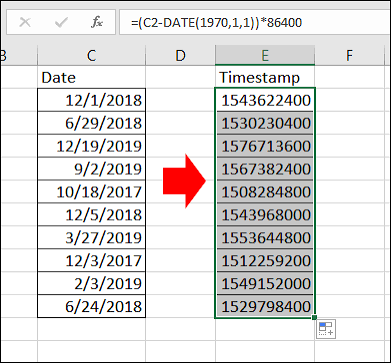
A free Unix timestamp converter helps you turn Unix timestamps into readable dates and times within seconds. Instead of trying to understand a long number, you can convert it into a familiar format that shows the exact date, time, and sometimes the day of the week.
Unix timestamps are widely used in websites, applications, databases, software development, and server logs. They provide a standard way to represent time as a number, making it easier for computer systems to store, compare, and process dates.
However, these numbers are not always easy for people to understand. For example, a timestamp such as 1792238400 may not look like a normal date. Converting it into a readable format makes the information easier to interpret.
Whether you are a developer, website owner, student, or general computer user, a free Unix timestamp converter can help you work with dates more efficiently.
In this guide, you will learn what Unix timestamps are, how to convert them into readable dates, how timestamp formats work, and how to avoid common conversion errors.
What Is a Unix Timestamp?
A Unix timestamp is a numerical representation of a specific point in time. In its traditional form, it counts the number of seconds that have passed since January 1, 1970, at 00:00:00 Coordinated Universal Time, commonly known as UTC.
This starting point is called the Unix epoch.
For example, the Unix timestamp 0 represents the beginning of the Unix epoch. A timestamp of 86400 represents one day after that starting point because a day contains 86400 seconds.
As time passes, the timestamp increases. This makes it possible for computers to represent dates and times using a simple numerical value.
Unix timestamps are useful because they allow systems to compare dates without relying on different regional date formats. A computer can calculate the difference between two timestamps to determine how much time has passed between two events.
However, a timestamp does not usually display the month, day, year, or time in a format that people recognize immediately. A timestamp converter solves this problem by transforming the numerical value into a readable date and time.
What Is a Free Unix Timestamp Converter?
A free Unix timestamp converter is a tool that changes a Unix timestamp into a human readable date and time. Depending on its features, it may also convert a date into a Unix timestamp.
The tool performs the necessary calculations and presents the result in a familiar format.
For example, you may want to convert a timestamp into a date that looks like this:
October 17, 2026, 08:00:00 UTC
Instead of calculating the date manually, you can enter the timestamp into a converter and view the result.
Most timestamp converters follow a simple process. You enter a numerical timestamp, select the appropriate unit if necessary, and run the conversion. The tool then displays the corresponding date and time.
Some converters also show the result in UTC, your local time zone, or both. This feature is particularly helpful when working with applications that serve users in different countries.
A good converter should make the result easy to read and clearly indicate the time zone used.
How to Convert a Unix Timestamp Into a Readable Date
Converting a Unix timestamp is straightforward when you know which format your timestamp uses.
Follow these steps to convert a timestamp into a readable date.
Step 1: Find the Unix Timestamp
First, identify the numerical value you want to convert.
You might find a timestamp in a database record, application log, API response, website event, or software configuration.
For example, a system may store the value 1792238400 to represent a particular point in time.
Step 2: Enter the Timestamp
Open a free Unix timestamp converter and enter the numerical value into the input field.
Make sure you copy the complete number. Missing or extra digits can produce an entirely different date.
Step 3: Check the Timestamp Unit
Determine whether your timestamp uses seconds or milliseconds.
Traditional Unix timestamps usually use seconds. Some programming languages, browser APIs, and applications use milliseconds instead.
A timestamp in milliseconds is typically much larger than a timestamp in seconds for the same date.
If the converter supports both formats, select the correct unit before continuing.
Step 4: Convert the Value
Run the conversion to generate the readable date and time.
The result may include the year, month, day, hours, minutes, and seconds.
Depending on the tool, you may also see the date in ISO 8601 format or another standard representation.
Step 5: Confirm the Time Zone
Check whether the result appears in UTC or local time.
The same moment can appear as different clock times in different time zones. This does not mean the timestamp is incorrect.
Confirming the time zone helps you understand the result accurately, especially when comparing events from different locations.
Understanding Unix Timestamp Formats
Before converting a timestamp, it is important to understand the two common units used to represent time.
Unix Timestamps in Seconds
A timestamp in seconds counts the number of seconds since the Unix epoch.
This is the traditional Unix timestamp format and remains common in server applications, databases, APIs, and programming environments.
For example, a timestamp with ten digits often represents a date in the modern era when expressed in seconds.
However, digit count alone does not guarantee the correct unit. Always consider the source of the value.
Unix Timestamps in Milliseconds
A timestamp in milliseconds counts time in thousandths of a second since the Unix epoch.
Because one second contains 1000 milliseconds, a timestamp in milliseconds is usually 1000 times the corresponding timestamp in seconds.
For example, JavaScript commonly uses milliseconds when representing dates as numerical values.
If you enter a millisecond timestamp into a converter that expects seconds, the result may point to a date far in the future. Similarly, treating a seconds timestamp as milliseconds can produce a date near the beginning of 1970.
Choosing the correct unit is one of the most important steps in accurate timestamp conversion.
Why Are Unix Timestamps Used?
Unix timestamps offer several advantages for computer systems and software applications.
One major advantage is consistency. A timestamp represents a specific moment independently of how a date appears on a user’s screen.
Read also: 6 Best Free Internal Linking Tools for WordPress
For example, one country may display a date as day, month, and year, while another uses month, day, and year. These formats can cause confusion when systems exchange information.
Unix timestamps avoid many of these formatting differences because they store time as a numerical value.
Another advantage is that timestamps make time calculations easier. Software can compare two timestamp values to determine which event occurred first or calculate the elapsed time between them.
Developers also use timestamps to record login activity, track transactions, organize log entries, manage scheduled tasks, and monitor website events.
However, timestamps are not always the best format for direct communication with users. Most people prefer dates such as October 17, 2026, rather than a long numerical value.
A Unix timestamp converter bridges this gap by translating machine friendly time values into readable dates.
Common Uses of a Unix Timestamp Converter
A free Unix timestamp converter can help with many everyday technical tasks.
Website Development
Website developers often work with timestamps when handling user activity, content publication dates, session expiration times, and scheduled events.
Converting timestamps makes it easier to verify that a website displays the correct date and time.
Database Management
Databases may store timestamps to record when information was created, updated, or accessed.
A converter helps database administrators and developers inspect these records without manually calculating dates.
API Testing
Many APIs return timestamps as part of their responses. These values may describe when an event occurred, when a token expires, or when a record was last modified.
Converting the values into readable dates makes API testing and troubleshooting easier.
Server Log Analysis
Server logs often include timestamps that help technical teams investigate errors and understand the order of events.
A converter can help identify when an error occurred or how much time passed between two log entries.
Scheduling and Event Management
Applications use timestamps to manage appointments, reminders, notifications, and scheduled tasks.
Converting these values helps users verify the intended execution time and identify possible time zone differences.
Common Unix Timestamp Conversion Errors
Even a simple timestamp conversion can produce confusing results when the input is incorrect.
Understanding common mistakes can help you avoid unnecessary troubleshooting.
Using the Wrong Unit
The most frequent mistake is confusing seconds with milliseconds.
Always check the documentation or source of your timestamp. If the result appears extremely far in the past or future, the unit may be incorrect.
Ignoring Time Zones
A timestamp can be converted correctly while displaying a different clock time from the one you expected.
This often happens because the converter displays UTC while you are expecting local time.
Check the time zone before deciding that the result is wrong.
Copying an Incorrect Value
A missing digit, an extra character, or an incomplete timestamp can change the result.
Copy the original value carefully and verify the input before converting it.
Confusing Date Formats
Different regions use different date formats. For example, 04/05/2026 can mean April 5 or May 4, depending on the format.
When sharing converted dates, consider using a format that clearly identifies the year, month, day, and time.
The ISO 8601 format, such as 2026 10 17T08:00:00Z when written with the standard separators, provides an unambiguous representation when used correctly. The letter Z indicates UTC.
Overlooking Negative Timestamps
Unix timestamps can also represent dates before January 1, 1970.
These values are negative because they refer to moments before the Unix epoch.
A negative timestamp is not necessarily an error. It may be a valid representation of a historical date.
How to Choose a Reliable Free Unix Timestamp Converter
When choosing a timestamp converter, look for a tool that provides accurate results and makes the conversion process simple.
First, check whether it supports both seconds and milliseconds. This reduces the risk of interpreting the input incorrectly.
Second, look for clear time zone information. A useful converter should indicate whether the output uses UTC or local time.
Third, consider whether the tool supports both directions of conversion. Converting a timestamp into a date is useful, but converting a date into a timestamp can also help with programming and testing.
Finally, choose a tool that presents results in a clear format. Options such as ISO 8601, UTC dates, and local dates can make the output easier to use in different situations.
For sensitive information, consider whether you can perform the conversion locally without submitting data to an external service.
The best choice depends on your needs. For occasional conversions, a simple online tool may be sufficient. For development work, a converter with unit selection, time zone support, and bidirectional conversion may be more practical.
Frequently Asked Questions
1. What is a Unix timestamp converter?
A Unix timestamp converter is a tool that changes a numerical time value into a readable date and time. Some converters also turn dates into Unix timestamps.
2. Is a free Unix timestamp converter accurate?
A converter can produce accurate results when you provide a valid timestamp and select the correct unit and time zone. Always check whether the input uses seconds or milliseconds.
3. How do I convert a Unix timestamp into a date?
Enter the timestamp into a converter, select seconds or milliseconds as appropriate, and run the conversion. The tool will display the corresponding date and time.
4. What is the difference between Unix timestamps in seconds and milliseconds?
A timestamp in seconds measures elapsed time in whole seconds since the Unix epoch. A timestamp in milliseconds measures the same period in thousandths of a second. Millisecond values are 1000 times larger for the same moment.
5. Why does my Unix timestamp show the wrong date?
The most common causes are using the wrong unit, entering an incorrect value, or viewing the result in an unexpected time zone. Check these details before trying the conversion again.
6. Can a Unix timestamp represent a date before 1970?
Yes. Negative Unix timestamps can represent dates before January 1, 1970. The exact result depends on the timestamp convention and how the conversion tool handles dates and time zones.
Conclusion
A free Unix timestamp converter makes it easier to understand numerical time values by turning them into readable dates and times. It is useful for developers, database administrators, website owners, and anyone who works with timestamp based data.
For accurate results, check the timestamp unit, confirm the time zone, and verify the input before converting it. Once you understand these basic principles, you can interpret Unix timestamps more confidently and use them effectively in everyday technical tasks.