Best Free Online Binary to Text Converters
Binary to text converters make it easy to turn binary code into readable text. They help users decode sequences of zeros and ones into letters, numbers, and other characters without installing special software. Whether you are a student learning computer science, a developer testing encoded data, or a beginner exploring how computers represent information, an online binary to text converter can simplify the process.
Many free online tools allow users to paste binary code into a text box and convert it within seconds. Some also support text to binary conversion, different character encodings, and file processing. However, not every converter offers the same features, accuracy, or ease of use.
Choosing the right tool depends on what you want to convert, how much data you need to process, and whether you need additional features.
In this guide, you will learn about the best free online binary to text converters, how they work, what features to look for, and how to convert binary code into readable text correctly.
What Is a Binary to Text Converter?
A binary to text converter is an online tool that changes binary data into readable characters. Binary code uses only two digits, zero and one, to represent information. Computers use this number system to store, process, and transfer data.
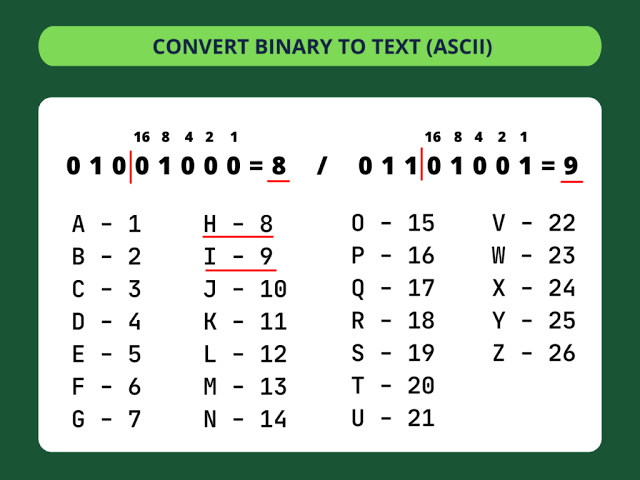
Text can be represented in binary by assigning numerical values to characters through an encoding system. For example, the letter A has the decimal value 65 in ASCII. Its eight bit binary representation is 01000001.
A binary to text converter interprets this binary sequence according to a supported character encoding and displays the corresponding character.
For example:
Binary input: 01001000 01101001
Text output: Hi
This process is useful when examining encoded messages, learning about digital information, debugging software, or working with data that contains binary representations of text.
It is important to understand that not all binary data represents ordinary text. Some binary sequences contain images, audio, executable instructions, or other types of information. A text converter may produce unreadable characters when the input does not represent valid text in the selected encoding.
Best Free Online Binary to Text Converters
Several online tools can convert binary code into readable text. The following options offer different approaches to binary conversion, from simple decoding to more general encoding tasks.
1. Browserling Binary to Text Converter
Browserling provides browser based tools for common programming and data conversion tasks. Its binary to text converter is useful for people who want to decode binary sequences without installing additional software.
Users can enter binary data and convert it into text through a straightforward interface. This makes the tool suitable for beginners who need a quick way to understand a binary message.
One advantage of a dedicated converter is that it keeps the process simple. Users do not need to learn programming commands or manually calculate character values.
Browserling is worth considering for basic decoding tasks, particularly when you want to convert a short sequence of binary digits into readable text.
2. RapidTables Binary to Text Converter
RapidTables offers online calculators and reference tools for mathematics, science, and computing. Its binary to text conversion tool can help users decode binary values into characters.
The tool is useful for students and beginners who want to understand the relationship between binary numbers and ordinary text. It also fits naturally into educational tasks involving number systems and character encoding.
A simple interface makes it easier to enter binary values, inspect the result, and compare the original sequence with the converted text.
RapidTables is a practical option for straightforward binary conversion. Users should still check that the input follows the format expected by the converter, especially when working with spaces or grouped binary digits.
3. ConvertBinary
ConvertBinary is an online conversion option for users who work with binary numbers and other common number systems.
Binary conversion tools are useful when you need to move between binary representations and readable characters. Depending on the available conversion options, you may also be able to explore relationships between binary, decimal, and hexadecimal values.
This type of tool can support basic programming exercises and help users understand how digital information is represented.
Before using any converter, check that you have selected binary to text conversion rather than a numerical conversion such as binary to decimal. These operations produce different results.
4. Online Binary Tools
Online Binary Tools is a collection of browser based utilities for working with binary data and related computing tasks.
A collection of specialized tools can be helpful when a project involves more than one conversion step. For example, you might need to inspect a binary sequence, change its representation, or compare different forms of encoded data.
These tools can be useful for developers, computer science students, and technically curious users.
When choosing a specific utility, confirm that it converts binary encoded text into characters rather than simply changing binary values into another number system.
5. CyberChef
CyberChef is a general purpose data transformation tool that supports many encoding, decoding, and data processing operations.
It can be particularly useful when binary conversion forms part of a larger task. For example, a user may need to decode text, transform encoded data, or apply several operations in sequence.
Instead of relying on a single conversion field, users can build a sequence of operations to process data. This provides more flexibility than a basic binary to text converter.
However, CyberChef may feel more complicated to beginners who only want to decode a short binary message. For simple tasks, a dedicated converter may be easier to use.
When selecting an online tool, remember that features and interfaces can change. Check the available operations before relying on a particular service for specialized conversion work.
How to Choose the Best Binary to Text Converter
The best free online binary to text converter depends on your needs. A suitable tool should produce accurate results, accept your input format, and make the conversion process easy to understand.
Ease of Use
A good converter should have a clear input area, an obvious conversion function, and an easy to read output section.
Beginners generally benefit from tools that require only a few steps. If you need to convert binary code occasionally, a simple interface may be more useful than a platform with many advanced settings.
Conversion Accuracy
Accuracy is essential when converting binary data into text. The tool should interpret the binary sequence correctly and use an appropriate character encoding.
For example, a standard ASCII character can be represented by eight binary digits. If the input contains missing digits or incorrect values, the converter may return unexpected results.
Always check the output when working with important data.
Character Encoding Support
Character encoding determines how numerical values correspond to letters, symbols, and other characters.
ASCII supports a limited set of characters, while UTF 8 can represent a much wider range of characters used in different languages.
If your binary data contains accented letters, non English characters, or other Unicode symbols, you may need a converter that supports the correct encoding.
Input Size and File Support
Some tools work best with short text strings, while others can process larger amounts of data.
If you need to decode a long binary sequence, check whether the converter supports your input size. You should also determine whether it accepts only pasted text or allows file uploads.
Read also: Best Free Online PDF to Word Converters
File support can be useful for technical tasks, but it is unnecessary if you only need to convert a short message.
Privacy and Security
Consider privacy before entering sensitive information into an online converter.
A website may process your input in your browser or send it to a remote server. Its handling of submitted data depends on how the service operates.
For confidential information, use a trusted offline tool or a method that keeps processing on your own device. Avoid submitting passwords, private messages, or proprietary data to an unfamiliar website.
How to Convert Binary to Text Online
Converting binary code into readable text is usually straightforward. Follow these steps to complete a basic conversion.
Step 1: Copy the binary code.
Obtain the binary sequence you want to decode. Check that it contains only zeros and ones, along with any separators accepted by the converter.
For example:
01001000 01101001
Step 2: Open a binary to text converter.
Choose a free online tool that specifically supports binary to text conversion.
Step 3: Enter the binary sequence.
Paste the code into the input field. Keep the digits in their original order because changing their position can change the decoded result.
Step 4: Convert the binary code.
Select the conversion button or function. The tool will interpret the binary sequence and display the corresponding text.
Step 5: Check the result.
For the example above, the expected output is:
Hi
If the result contains strange characters or errors, check the binary sequence and the character encoding. The input may be incomplete, incorrectly grouped, or intended to represent something other than ordinary text.
Common Binary to Text Conversion Problems
Even a reliable converter can produce unexpected results when the input is incorrect or uses an unsupported format.
One common problem is an incomplete binary sequence. If the data is intended to use eight bit groups, a group with missing digits may prevent the converter from interpreting the input as expected.
Another issue is incorrect spacing. Some converters accept spaces between groups of eight digits, while others require a continuous sequence. Follow the formatting instructions provided by the tool.
Character encoding can also affect the output. Binary data representing text in UTF 8 may not decode correctly if the converter assumes a different encoding.
Finally, remember that binary numbers do not automatically represent text. A sequence may contain numerical values, compressed data, or other information that requires a different decoding method.
Understanding these limitations can help you identify problems and choose the correct conversion tool.
Binary to Text Converter vs Text to Binary Converter
A binary to text converter and a text to binary converter perform opposite operations.
A binary to text converter takes a binary representation of encoded text and converts it into readable characters.
A text to binary converter takes readable text and produces a binary representation using a specified character encoding.
For example, using ASCII:
Text input: A
Binary output: 01000001
When the same binary representation is decoded using the corresponding encoding, the result is A.
These tools are useful for different purposes. Binary to text conversion helps you understand encoded information, while text to binary conversion helps you examine how text can be represented in binary.
Some online converters support both operations, making them convenient for learning and testing.
Conclusion
The best free online binary to text converter is one that matches your needs, accepts your input format, and produces accurate results.
Browserling and RapidTables are worth considering for simple conversion tasks. ConvertBinary and Online Binary Tools may suit users who need additional binary related utilities, while CyberChef is useful for more complex data processing.
Before choosing a tool, consider ease of use, character encoding support, input size, and privacy. For basic tasks, a dedicated converter is often sufficient. For larger or more complicated projects, a tool with additional processing features may be more appropriate.
By understanding how binary encoding works and checking your input carefully, you can convert binary code into readable text more confidently.
Frequently Asked Questions
1. What is the best free online binary to text converter?
The best option depends on your requirements. Browserling and RapidTables are useful starting points for basic conversions, while CyberChef offers more advanced data processing features.
2. How do I convert binary code into text?
Copy your binary sequence, paste it into a binary to text converter, and run the conversion. The tool will interpret the binary values and display the corresponding characters if the input uses a supported text encoding.
3. Can I convert binary to text without installing software?
Yes. Many online converters work directly in a web browser. You can enter binary code and view the decoded text without installing a separate application.
4. Why does my binary to text converter show strange characters?
Strange characters can appear when the binary sequence is incomplete, incorrectly formatted, or decoded with the wrong character encoding. The data may also represent something other than ordinary text.
5. Is binary to text conversion the same as binary to decimal conversion?
No. Binary to text conversion interprets binary values as encoded characters, while binary to decimal conversion changes a number from base two to base ten. The same binary digits can produce different results depending on the operation.
6. Is it safe to use a free online binary to text converter?
It depends on how the website processes and stores submitted data. Avoid entering sensitive information into unfamiliar tools. For confidential data, consider using a trusted offline converter or a method that processes information locally on your device.