List of Free Online JSON to CSV Converters for Developers
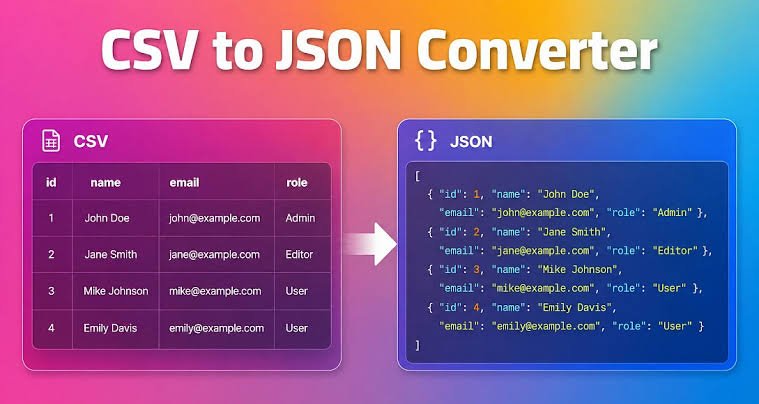
JSON and CSV are two common formats used to store, exchange, and process data. JSON is widely used in web applications, APIs, and software development. CSV is often used for spreadsheets, reports, databases, and data analysis.
Developers sometimes need to convert JSON data into CSV format to make it easier to read, share, or import into other applications. A free online JSON to CSV converter can simplify this process without requiring additional software or programming code.
Several online tools allow users to paste JSON data, upload a file, or convert structured information into a CSV file. Some also provide options for handling nested objects, selecting fields, and downloading the converted data.
In this guide, we explore some useful free online JSON to CSV converters for developers. We also explain their main features, practical uses, and how to choose the right tool for different projects.
What Is a JSON to CSV Converter?
A JSON to CSV converter is an online tool that transforms data from JavaScript Object Notation into Comma Separated Values format.
JSON stores data using objects, arrays, keys, and values. It is commonly used to exchange information between applications and servers.
CSV stores tabular data in rows and columns. Each row represents a record, while each column represents a field. Commas typically separate individual values.
For example, consider this JSON data:
[
  {
    "name": "John",
    "age": 28,
    "city": "Lagos"
  },
  {
    "name": "Mary",
    "age": 32,
    "city": "Abuja"
  }
]
After conversion, the CSV output looks like this:
name,age,city
John,28,Lagos
Mary,32,Abuja
The converted data can be opened in spreadsheet applications, imported into compatible databases, or processed with data analysis tools.
Best Free Online JSON to CSV Converters
The following tools offer different approaches to converting JSON data into CSV format. Their suitability depends on the size of your data, the structure of your JSON files, and your privacy requirements.
1. ConvertCSV
ConvertCSV is an online conversion service designed to help users transform data between different formats. Its JSON conversion functionality can be useful for developers who need to turn structured records into spreadsheet friendly data.
The tool is suitable for straightforward conversion tasks involving JSON objects and arrays. Instead of writing a custom conversion script, users can work through a browser based interface.
ConvertCSV can be useful when preparing data for spreadsheets, reports, and other applications that accept CSV files.
Key features
- Online data conversion without installing desktop software.
- Support for converting structured data into tabular formats.
- A practical option for occasional conversion tasks.
- Useful for developers working with exported application data.
Best for: Developers who need a browser based conversion tool for routine data preparation.
Before converting complex JSON, check whether the available converter supports your particular structure and required output format.
2. TableConvert
TableConvert is an online data conversion tool that supports several structured data formats. It is useful for developers who want to transform JSON into a table and export the results into CSV.
The tool provides a visual approach to data conversion. This can make it easier to inspect records and identify formatting issues before using the output elsewhere.
TableConvert is also useful when working with data that needs to move between different formats during development.
Key features
- JSON to CSV conversion.
- Visual presentation of structured data.
- Support for multiple data formats.
- Options for preparing data for spreadsheet applications.
Best for: Developers who prefer viewing their JSON data in a table before exporting it.
TableConvert can be especially convenient when you need to inspect a small dataset manually. For deeply nested JSON, review the resulting table to confirm that important information has not been omitted.
3. Konklone JSON to CSV
Konklone JSON to CSV is a conversion tool designed specifically to transform JSON data into CSV format.
It is useful for developers who work with API responses, exported records, and collections of JSON objects. Its straightforward purpose makes it a relevant option for converting structured data into a format that spreadsheet applications can process.
The tool can help reduce the need to write a separate conversion script for simple datasets.
Key features
- JSON to CSV conversion.
- A browser based workflow.
- Support for converting suitable JSON records into tabular data.
- A useful option for API data preparation.
Best for: Developers who regularly work with JSON responses and need CSV output.
As with other converters, check how the tool handles nested objects, missing values, and arrays. These structures can affect the final CSV output.
4. BeautifyTools JSON to CSV Converter
BeautifyTools provides online utilities for working with structured text and development data. Its JSON to CSV conversion functionality is intended to help users transform JSON data into a spreadsheet compatible format.
The tool can be useful when you need to convert data quickly without creating a script or installing a package.
Developers can use this type of converter to prepare sample data, inspect records, or move information into spreadsheet applications for further analysis.
Key features
- Browser based JSON conversion.
- A simple workflow for common conversion tasks.
- Useful functionality for working with structured data.
- No need to build a dedicated converter for basic datasets.
Best for: Beginners and developers who need a simple online JSON conversion utility.
For larger datasets, confirm that the tool can process the entire file. Also, inspect the output before using it in a production workflow.
5. Code Beautify JSON to CSV Converter
Code Beautify offers several online tools for formatting and converting data. Its JSON to CSV converter is intended for users who need to change structured JSON information into rows and columns.
This type of tool can be helpful when debugging API responses or preparing records for spreadsheet analysis.
For example, a developer might receive customer records from an API in JSON format but need to share those records with a team that uses spreadsheet software. Converting the records to CSV can make them easier to review.
Key features
- Online JSON to CSV conversion.
- Browser based access.
- Tools for working with structured data.
- A convenient option for preparing information for spreadsheets.
Best for: Developers who want a general purpose online utility for converting JSON data.
Always validate the output when the original data contains nested objects or arrays. A conversion tool may flatten these structures, represent them as text, or handle them differently depending on its implementation.
6. JSON Formatter
JSON Formatter is commonly associated with tools for formatting, validating, and inspecting JSON data. Depending on the available conversion features, it can be useful as part of a workflow for preparing JSON before converting it into CSV.
Validating JSON is important because malformed input can prevent a converter from producing the expected output.
Read also: How to Use Chris Titus Tech’s Windows Utility
For example, a missing quotation mark, an extra comma, or an incorrectly closed bracket can make a JSON document invalid.
A developer can first format or validate the data, then use a suitable JSON to CSV converter to produce the final file.
Key features
- Tools for inspecting JSON structure.
- JSON formatting and validation functionality.
- A useful step in preparing data for conversion.
- Assistance with identifying malformed JSON.
Best for: Developers who need to check JSON data before converting it to CSV.
Check whether the particular JSON Formatter service you choose includes a direct CSV export feature. Some tools focus primarily on formatting and validation rather than conversion.
How to Choose the Right JSON to CSV Converter
Not every online converter handles JSON data in the same way. The best option depends on your technical requirements and the structure of your input.
Check JSON Structure Support
Simple JSON arrays containing objects are usually easier to convert than deeply nested data.
For example, an array of user records with fields such as name, email, and age can usually be represented in a conventional table.
However, JSON containing nested addresses, product lists, or multiple arrays may require additional processing. Choose a converter that supports the structure you need to preserve.
Consider File Size
Some online tools may have limits on input size, processing time, or the number of records they can handle.
Small datasets are generally suitable for browser based converters. Large API exports or extensive database records may be easier to process with a local script.
Before converting a large file, check the tool’s limits and test it with a smaller sample.
Review Privacy and Security
JSON files can contain personal information, authentication details, customer records, or confidential business data.
Uploading such information to an online service can introduce privacy risks. Review the service’s privacy practices before using it.
For sensitive information, consider a local conversion method that processes the file on your own computer.
Never upload API keys, passwords, access tokens, or other secrets to an online converter.
Verify CSV Output
A successful conversion does not always guarantee that the output is suitable for your application.
Check that column names are correct, values appear in the expected columns, and special characters remain intact.
Pay particular attention to commas, quotation marks, line breaks, and missing values. These can affect how CSV files are interpreted by spreadsheet applications and other software.
How to Convert JSON to CSV Online
Converting JSON to CSV usually involves a few simple steps.
Step 1: Prepare your JSON data.
Copy the JSON response from your application, API, or data file. Confirm that the structure is valid before continuing.
Step 2: Open a JSON to CSV converter.
Choose an online tool that supports your input format and expected output.
Step 3: Enter or upload the JSON data.
Paste the content into the input field or upload the file if the tool supports file uploads.
Step 4: Convert the data.
Run the conversion and review the resulting table or CSV text.
Step 5: Download or copy the output.
Save the generated CSV file or copy its contents into a compatible application.
Step 6: Validate the result.
Open the CSV file and check the columns, records, and special characters. Confirm that the output contains the information your application needs.
When Should Developers Use a Programmatic Converter?
Online JSON to CSV tools are convenient for occasional tasks, testing, and small datasets. However, programmatic conversion can be a better choice for repeated or automated workflows.
For example, developers may need to convert API responses into CSV reports every day. A script can perform this task automatically without requiring manual uploads.
Programmatic conversion also gives developers more control over field selection, nested objects, missing values, and output formatting.
The choice depends on the task. Use an online converter for quick, low risk conversions. Consider a local script when processing large files, handling confidential data, or automating recurring tasks.
Frequently Asked Questions
1. What is the best free online JSON to CSV converter?
The best option depends on your requirements. TableConvert, Konklone JSON to CSV, Code Beautify, and other conversion utilities can help with common tasks. Compare their supported structures, file limits, and output options before choosing one.
2. Can I convert JSON to CSV without installing software?
Yes. Many online converters work directly in a web browser. You can paste or upload JSON data, convert it, and save the resulting CSV file without installing a dedicated application.
3. Can I convert a JSON file containing nested objects to CSV?
Yes, but the result depends on the converter. Some tools flatten nested objects into additional columns, while others may preserve nested values as text or handle them differently. Review the output carefully.
4. Is JSON to CSV conversion safe online?
It can be suitable for non sensitive data, but uploading confidential information introduces potential privacy risks. For sensitive files, use a trusted local conversion method and avoid sharing passwords, API keys, or private records with online services.
5. Can I open a CSV file in Excel?
Yes. Microsoft Excel supports CSV files. You can open the file or import it through Excel’s data import features. Check the character encoding and delimiter settings if the columns or special characters appear incorrectly.
6. What is the difference between JSON and CSV?
JSON supports structured data, including objects, arrays, and nested values. CSV represents information in rows and columns. JSON is common in APIs and web applications, while CSV is widely used for spreadsheets, reporting, and data exchange.