9 Free Online PDF Splitters for Large Documents
Large PDF documents can be difficult to manage when you only need a few pages. A report might contain hundreds of pages, while an application, invoice, or research paper may require only a small section. Instead of sharing or storing the entire document, you can use a free online PDF splitter to separate the pages you need.
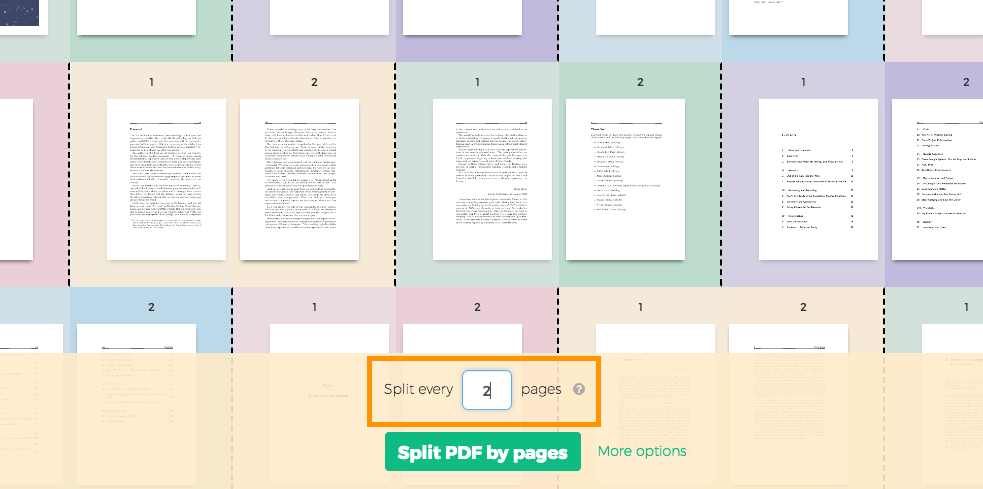
Online PDF splitters allow you to divide a PDF into smaller files without installing desktop software. Depending on the tool, you can extract individual pages, select specific page ranges, or divide a document into several smaller parts. Some tools also support merging PDFs, compressing files, and converting documents into other formats.
However, not every PDF splitter handles large documents in the same way. File size limits, processing speed, privacy policies, and available features can affect your experience.
This guide explores nine free online PDF splitters for large documents. It explains their main features, potential limitations, and the situations in which each tool may be useful.
1. Smallpdf
Smallpdf is an online PDF management platform with tools for splitting, merging, compressing, and converting PDF documents. Its PDF splitter helps users separate selected pages from a larger file.
The tool is suitable for people who need to extract a few pages from reports, contracts, presentations, or other documents. Its straightforward interface makes it accessible to beginners who do not have experience with PDF editing software.
You can upload a PDF, select the pages you want to separate, and download the resulting files. Depending on your selection, you can create individual page files or divide the document into smaller sections.
Smallpdf also provides other PDF tools that can help you prepare documents before sharing them.
Best for: Beginners who need a simple way to extract pages from PDF documents.
What to consider: Free usage may have restrictions, and some advanced features require a paid plan. Check the current file size and usage limits before processing a large document.
2. iLovePDF
iLovePDF is an online PDF tool that offers splitting, merging, compression, and conversion features. Its split function allows users to divide documents by selecting page ranges or extracting individual pages.
For example, if a PDF contains several chapters, you can separate each chapter into its own file. This approach can make lengthy reports easier to organize and distribute.
The platform also provides tools for reducing PDF file sizes. This can be useful when a document is too large to upload to a website or send through email.
Its range of related tools makes iLovePDF a practical option for people who regularly work with digital documents.
Best for: Users who want PDF splitting alongside compression and merging tools.
What to consider: Free accounts and online processing may have usage or file size restrictions. Very large documents may require a different workflow.
3. Adobe Acrobat Online
Adobe Acrobat Online provides browser based PDF tools, including options for organizing and separating PDF pages. It is useful for people who want to manage documents without installing the full desktop application.
PDF splitting can help when you need to separate a long report into smaller files or extract selected sections from a document. The broader Acrobat platform also includes features for rearranging, deleting, and organizing pages.
Because Adobe develops the PDF format and related software, its tools may be particularly familiar to people who already work with Acrobat documents.
However, the availability of specific online features can depend on the tool, account, and subscription.
Best for: Users who want a PDF management tool from an established PDF software provider.
What to consider: Not every feature is free. Check whether the splitting function and required downloads are available without a paid subscription.
4. PDF24 Tools
PDF24 Tools is an online PDF utility platform that offers splitting, merging, compression, and other document management features. Its PDF splitter allows users to separate pages according to their requirements.
The tool can be useful for dividing large documents into smaller sections. For example, a teacher could separate selected pages from a course manual, while an office worker could divide a long report into separate sections.
PDF24 also provides a desktop application for Windows. This can be useful when you regularly process large documents or prefer working without uploading files to an online service.
The desktop option is particularly relevant for users who have concerns about uploading confidential documents to a website.
Best for: Users who want online PDF splitting with an alternative desktop option.
What to consider: Browser processing and desktop processing have different requirements. If you are working with a very large PDF, consider your computer’s available memory and the tool’s current limits.
5. Sejda PDF
Sejda PDF offers online PDF editing tools, including options for splitting documents into smaller files. Users can select specific pages or divide a document into separate sections, depending on the available splitting options.
The platform is useful when you need more control over which pages appear in each output file. This can help when preparing extracts from lengthy business reports, academic papers, or administrative documents.
Sejda also provides editing, compression, and merging tools, so you can complete several document management tasks within the same platform.
Its free online service is subject to usage restrictions, which are important to consider when working with large files.
Best for: Users who need flexible page selection when splitting PDFs.
What to consider: Free processing limits can affect file size, the number of tasks, and how often you can use the service. Review the current restrictions before uploading a lengthy document.
6. PDF Candy
PDF Candy is an online document management platform that includes a PDF splitter. It allows users to divide PDF files into smaller documents according to their page requirements.
This can be helpful when a single PDF contains multiple forms, chapters, receipts, or reports that need to be distributed separately.
PDF Candy also offers tools for converting, merging, compressing, and editing PDF files. These features can simplify document preparation when you need to perform several related tasks.
The platform is designed for general users, so it can be a reasonable choice for people who want a browser based solution without learning complicated software.
Read also: How to Generate SEO Friendly Blog Post Outlines Using AI
Best for: Users who need PDF splitting and other basic document management features.
What to consider: Free access may include restrictions, and the experience can vary depending on the file size and selected processing method. Check the available limits before splitting a large document.
7. Xodo PDF
Xodo PDF provides document viewing, editing, and management tools across its available platforms. Its PDF tools can help users organize documents and separate pages where splitting functionality is available.
Xodo may be useful for students, professionals, and businesses that work with PDFs regularly. For example, you might need to extract a chapter from a textbook, separate pages from a business proposal, or prepare a smaller document for sharing.
The platform offers several PDF related features, making it worth considering if you need more than a basic page splitter.
However, the exact features available through its online tools may differ from those offered by its desktop or mobile products.
Best for: Users who want PDF management features beyond splitting alone.
What to consider: Confirm that the specific splitting option you need is available for free in the version you intend to use. Check file size restrictions before processing a large document.
8. PDF2Go
PDF2Go is an online PDF editing platform with tools for splitting, merging, compressing, and converting documents.
Its splitting features can help users divide lengthy PDFs into manageable sections. Depending on the available options, you can separate selected pages or divide a document into multiple files.
The platform is useful for preparing documents for email, online submissions, or sharing with colleagues. Smaller files can be easier to upload and organize, although splitting does not always reduce the combined size of the original document.
PDF2Go also provides other tools that can help when a PDF needs additional editing before distribution.
Best for: Users who want an online PDF splitter with several supporting document tools.
What to consider: Free processing may be subject to limits on file size, task frequency, or available features. If your document is particularly large, verify the current restrictions first.
9. AvePDF
AvePDF is an online document processing platform that offers tools for working with PDF files. Its available PDF utilities can help users organize documents and perform tasks such as splitting or extracting pages.
The platform may be useful when you need to separate sections from a lengthy document without installing additional software. For example, you could extract a group of pages from a business report or create smaller files from a collection of reference materials.
AvePDF also provides other document processing options, depending on the tool selected.
Before using it for a large file, review the available splitting settings to determine whether they match your requirements.
Best for: Users looking for another browser based option for managing PDF documents.
What to consider: Available features and processing limits may vary. Confirm that the splitter supports your file size and preferred page selection method.
How to Choose the Best Free Online PDF Splitter
The right PDF splitter depends on the size of your document, the type of split you need, and how sensitive the file is.
Check the Maximum File Size
Large PDFs can contain hundreds of pages, high resolution images, or scanned documents. These elements can increase the file size considerably.
Before uploading a document, check the tool’s maximum file size. If your PDF exceeds the limit, consider using a desktop application or splitting the file locally with suitable software.
Look for Flexible Page Selection
Some users need to extract one page, while others want to divide a document into several sections.
Choose a tool that supports your preferred method. If you need to separate chapters, page range selection can be more convenient than extracting pages individually.
Consider Privacy and Security
PDF documents may contain personal information, financial records, contracts, or confidential business details.
Before uploading a sensitive file, review the service’s privacy policy, file retention practices, and deletion options. If you cannot upload the document to an online service, consider an offline PDF application instead.
Do not assume that every online tool handles uploaded files in the same way.
Check Download and Usage Restrictions
A tool may allow you to split a PDF for free but limit the number of tasks you can perform. Other restrictions may apply to file size, processing speed, or particular features.
Check these conditions before starting, especially if you need to split several large documents.
Decide Whether You Need Other PDF Features
If you frequently work with documents, a platform that includes merging, compression, and page organization can save time.
However, if you only need to separate a few pages occasionally, a basic splitter may be sufficient.
Frequently Asked Questions
1. What is a PDF splitter?
A PDF splitter is a tool that divides one PDF document into multiple files. It can extract selected pages, separate page ranges, or divide a long document into smaller sections.
2. Can I split a large PDF online for free?
Yes. Several online tools offer free PDF splitting, including Smallpdf, iLovePDF, PDF24 Tools, and PDF Candy. However, free services may impose file size limits or restrictions on usage.
3. How do I split a PDF into separate pages?
Open a PDF splitting tool, upload your document, and select the option to extract individual pages. Start the process and download the resulting files. The exact steps depend on the tool.
4. Will splitting a PDF reduce its file size?
Not necessarily. Splitting separates a document into smaller files, but it does not automatically compress the content. If you need smaller files for uploading or emailing, use a PDF compression tool as well.
5. Is it safe to use an online PDF splitter?
Safety depends on the service, its security practices, and the information contained in your document. Review the privacy policy and file deletion options before uploading. For highly confidential documents, an offline application may be a better choice.
6. What should I do if my PDF is too large to upload?
Check the tool’s maximum file size first. If the document exceeds that limit, try an offline PDF application, use a service that supports larger files, or compress the PDF before uploading it. If you compress the file, check that its text and images remain readable.