Best Free AI Note Generators for Lecture Transcripts
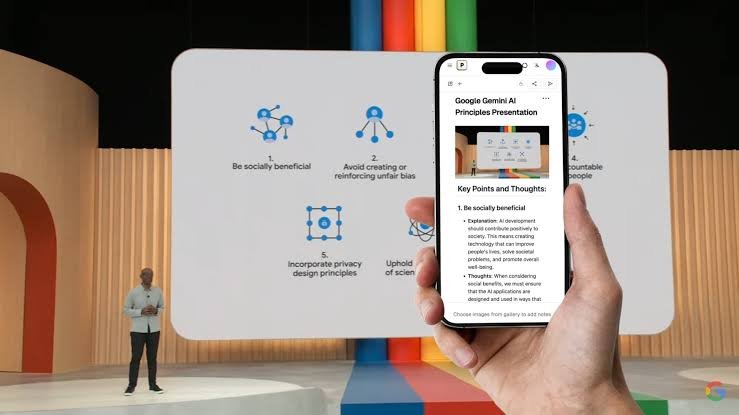
AI note generators help students turn lecture transcripts into organized notes that are easier to read, understand, and review. Instead of reading long transcripts line by line, students can use these tools to identify important concepts, summarize explanations, and organize information into clear sections.
Many free AI note generators support features such as automatic summaries, key point extraction, question generation, and structured study notes. Some tools work with uploaded documents, while others can process recorded lectures, audio files, or text copied from a transcript.
Choosing the right tool depends on your study habits, the format of your lecture materials, and the features available in the free version. Some tools are better for summarizing long lectures, while others are useful for creating revision materials and organizing notes across multiple subjects.
In this guide, we explore the best free AI note generators for lecture transcripts, explain their main features, and discuss how students can use them to improve their study routines.
What Is an AI Note Generator for Lecture Transcripts?
An AI note generator is a tool that uses artificial intelligence to convert information into shorter, organized, and easier to understand notes.
When working with lecture transcripts, these tools can identify the main topics, summarize lengthy explanations, and arrange important information under relevant headings.
For example, a transcript from a two hour biology lecture may contain repeated explanations, classroom discussions, and detailed examples. An AI note generator can help condense this material into sections covering the main concepts, definitions, processes, and examples.
Depending on the tool, users may also be able to generate flashcards, practice questions, revision summaries, and lists of important terms.
However, AI generated notes are not always accurate. Students should review the results and compare important details with the original transcript, especially when studying technical subjects.
1. Google NotebookLM
Google NotebookLM is an AI powered research and study tool that helps users understand information from their own documents and other supported sources.
It is useful for students who have lecture transcripts saved as documents or text files. After adding supported materials to a notebook, users can ask questions about the content and generate summaries based on their sources.
NotebookLM can help organize lecture information into understandable explanations. Students can use it to identify important ideas, compare concepts discussed in different lectures, and find answers to questions about their study materials.
One useful feature is its source focused approach. This makes it easier to check where information comes from instead of relying entirely on general AI responses.
The tool can also help students create study guides and prepare questions based on their materials.
Best for: Students who want to summarize lecture transcripts, understand difficult topics, and study from multiple documents.
Free plan: A free version is available, although usage limits and feature availability may change.
2. ChatGPT
ChatGPT is a general purpose AI assistant that can help transform lecture transcripts into structured study notes.
Students can paste transcript text into a conversation or upload supported files, depending on their account and the available features. They can then request summaries, topic outlines, key definitions, and explanations of difficult concepts.
For example, a student can ask ChatGPT to organize a lecture transcript into an introduction, main concepts, examples, important terms, and revision questions.
It can also simplify complicated explanations without removing essential information. This is particularly useful when lecture notes contain technical language or unfamiliar concepts.
Another advantage is flexibility. Students can request different note formats based on their needs, such as concise revision notes, detailed chapter summaries, or question and answer study sheets.
However, ChatGPT can occasionally misunderstand a transcript or introduce information that was not included in the original material. Students should verify important facts and avoid treating generated notes as a replacement for their course materials.
Best for: Students who want flexible note formats, simplified explanations, summaries, and practice questions.
Free plan: A free version is available with usage limits that may vary.
3. Microsoft OneNote
Microsoft OneNote is a digital note taking application that helps students organize information into notebooks, sections, and pages.
Although OneNote is not exclusively an AI note generator, it can be useful for storing and organizing AI generated lecture notes. Students can keep transcripts, summaries, personal observations, and revision materials together in one place.
When used with compatible Microsoft AI features, it may also support assistance with summarizing or working with notes. Availability depends on the product, account, and subscription.
A practical approach is to generate a lecture summary using an AI assistant and then save the result in OneNote. Students can create separate sections for different subjects and organize notes by lecture date or topic.
This arrangement makes it easier to revisit previous lessons before examinations.
OneNote is especially helpful for students who prefer maintaining their own notes instead of relying entirely on automatically generated summaries.
Best for: Students who want to organize lecture transcripts and study notes in a digital notebook.
Free plan: OneNote offers free access, although some additional features depend on the Microsoft account or subscription.
4. Notion AI
Notion combines note taking, document management, and workspace organization. Its AI features can help users summarize information, improve writing, and organize lengthy text.
Students can store lecture transcripts in Notion pages and use available AI tools to turn the material into shorter summaries or structured notes.
For example, a transcript can be organized into headings for key concepts, definitions, examples, and questions to review later.
Notion is also useful for managing notes across several courses. Students can create a central study workspace with separate pages for subjects, assignments, lecture summaries, and examination preparation.
However, access to AI features may be limited by the current plan. Students should check which AI capabilities are included before choosing Notion specifically for automatic transcript summarization.
Best for: Students who want to combine AI assisted notes with study planning and document organization.
Free plan: Notion has a free plan, but its AI features and usage allowances may require a paid subscription.
5. Otter.ai
Otter.ai focuses on recording conversations, transcribing speech, and organizing meeting information. These capabilities can also be useful for students who need notes from recorded lectures.
Instead of starting with an existing transcript, students can use compatible recording features to convert spoken content into text. The platform can then help identify key discussion points and produce summaries, depending on the available features.
This can reduce the amount of manual transcription required after a lecture.
Otter.ai is particularly relevant for students who attend online classes, participate in recorded discussions, or want to review spoken explanations.
However, transcription accuracy depends on audio quality, speaker clarity, background noise, and the subject being discussed. Technical terms and unfamiliar names may require correction.
Free usage limits may also restrict recording time, transcription capacity, or access to certain features.
Best for: Students who want to transcribe spoken lectures and review summaries of recorded discussions.
Free plan: A free plan is available with restrictions on usage and features.
Read also: 10 Free Tools to Check Your Blog’s Readability Score
6. TurboLearn AI
TurboLearn AI is designed around AI assisted learning and note creation. It is intended to help students transform educational materials into resources that support revision and understanding.
Depending on the features available, students may be able to provide lecture recordings, documents, or other supported materials and generate organized notes.
The platform also focuses on study resources such as flashcards and quizzes. These features can help students move beyond reading summaries and test how well they understand the material.
For example, a student studying economics could use lecture notes to review important definitions and then practice answering questions about supply, demand, and market behavior.
Students should check the supported input formats and current free usage limits before uploading their materials.
Best for: Students who want lecture notes alongside quizzes and other revision resources.
Free plan: Free access or trial options may be available, but the included features and limits can change.
7. Knowt
Knowt is a study platform that helps students create and review learning materials, including flashcards and practice questions.
It can be useful when lecture transcripts need to become more interactive study resources. Rather than simply producing a shorter version of a lecture, students can use supported features to create materials for active recall.
Active recall involves trying to remember information without immediately looking at the answer. This method can help students identify gaps in their understanding.
For example, a history student could turn a lecture transcript into flashcards covering important dates, historical figures, events, and causes.
The availability of automatic note generation and other AI features may depend on the current product offering.
Best for: Students who want to turn lecture content into flashcards, practice questions, and revision materials.
Free plan: Knowt offers free study features, although some tools may have restrictions.
8. StudyFetch
StudyFetch is an AI powered learning platform designed to help students study from their course materials.
Depending on the supported formats and current plan, students may be able to upload educational documents or lecture materials and use AI features to create study notes and practice resources.
The platform focuses on helping learners review information and prepare for assessments. This makes it relevant for students who want to use lecture transcripts for more than simple summarization.
For example, a student could organize notes from a chemistry lecture and use available study features to practice important definitions or concepts.
As with other AI learning platforms, students should review generated materials carefully. Incorrect definitions or incomplete explanations can create confusion during revision.
Best for: Students who want AI assisted study resources based on their course materials.
Free plan: Free access may be available with limits on features or usage. Check the current plan details before relying on a particular capability.
How to Choose the Best Free AI Note Generator
The best AI note generator depends on the type of lecture material you have and how you prefer to study.
If you already have lecture transcripts, choose a tool that accepts pasted text or uploaded documents. ChatGPT and NotebookLM are useful options for summarizing existing materials and asking questions about their contents.
If you need to convert recorded lectures into text, consider a transcription focused tool such as Otter.ai. Check its recording and transcription limits before using it for lengthy classes.
Students who want to organize notes across multiple subjects may prefer OneNote or Notion. Both can help maintain a consistent structure for course materials, even when the actual summarization happens elsewhere.
If your main goal is examination preparation, platforms such as Knowt, TurboLearn AI, and StudyFetch may be worth exploring for their study focused features.
Before choosing a tool, consider these important factors:
Supported file formats: Check whether the tool accepts your transcript format, audio recordings, PDFs, or text documents.
Free usage limits: Some tools restrict the number of uploads, minutes of transcription, or AI requests available without payment.
Accuracy: Review generated notes for missing information, incorrect definitions, and misleading summaries.
Privacy: Avoid uploading confidential classroom discussions, personal information, or restricted educational materials unless you have permission and understand how the service handles your data.
Ease of use: Choose a tool that fits your existing study routine and does not require unnecessary steps.
How to Get Better Results from AI Lecture Note Generators
The quality of generated notes depends partly on the instructions you provide and the quality of the transcript.
Start with a clear request. Instead of asking an AI tool to summarize a lecture, explain exactly what you want it to produce.
For example, you can use this prompt:
“Turn this lecture transcript into organized study notes. Use clear headings, summarize the main ideas, explain important terms, preserve relevant examples, and identify key facts. Do not add unsupported information. Finish with ten revision questions and their answers. If any part of the transcript is unclear, identify it rather than guessing.”
For long transcripts, consider processing the material in sections. This can make it easier to preserve important details and reduce the risk of losing information in an overly short summary.
After generating the notes, compare them with the original transcript. Check definitions, formulas, dates, examples, and other details that may be important for your course.
You can also ask the tool to identify topics that need further explanation. Use the resulting notes as a starting point for active recall, practice questions, and regular revision.
The goal is not simply to make lecture notes shorter. It is to create a reliable study resource that helps you understand and remember the material.
Frequently Asked Questions
1. What is the best free AI note generator for lecture transcripts?
Google NotebookLM and ChatGPT are useful starting points for summarizing existing transcripts. NotebookLM is particularly suitable for working with source materials, while ChatGPT offers flexibility in how notes are organized and explained.
2. Can AI turn a lecture transcript into study notes?
Yes. Many AI tools can summarize transcripts, organize information under headings, extract key points, and create revision questions. The available features depend on the tool and its free plan.
3. Can I generate notes from recorded lectures?
Yes. Transcription tools such as Otter.ai can convert supported recordings into text. Some AI learning platforms also support audio based study workflows. Check the supported formats and usage limits before uploading a recording.
4. Are free AI note generators accurate?
They can produce useful summaries, but they are not always accurate. They may omit important details, misunderstand technical terms, or generate incorrect information. Always check the notes against the original lecture materials.
5. Can AI note generators create flashcards and quizzes?
Yes. Some tools, including Knowt and TurboLearn AI, offer study focused features such as flashcards and quizzes. Other AI assistants can generate these resources when you provide a transcript and clear instructions.
6. Are free AI note generators safe to use for university lectures?
They can be suitable for ordinary study materials, but privacy depends on the service and its settings. Review the provider’s data policies and avoid uploading confidential recordings or personal information without permission.