Grammar Checker Online Free Without Signup: Best Checker for Students
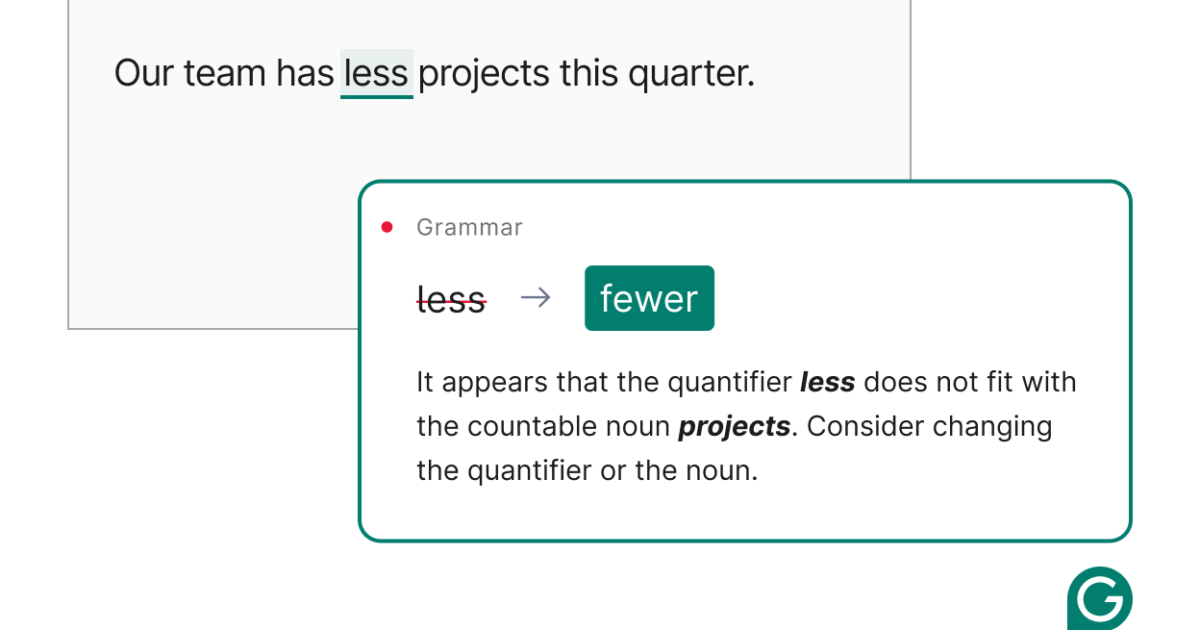
Writing clear and correct English is important for every student. Whether you are preparing an essay, completing an assignment, writing a report, or sending an email to a lecturer, grammar mistakes can affect the quality of your work. A grammar checker online free without signup helps students identify common writing errors without creating an account or sharing personal information during registration.
These tools can check spelling, punctuation, sentence structure, and other grammar problems in written text. Some also suggest better word choices and help improve sentence clarity. Most online grammar checkers are easy to use, even for students who have limited experience with writing tools.
However, not every grammar checker offers the same features. Some focus mainly on spelling, while others provide detailed suggestions for improving grammar and readability. Choosing the right tool depends on your writing needs, the type of assignment, and the level of feedback you want.
This guide explains how free online grammar checkers work, which features students should look for, and how to choose a suitable checker without signing up.
What Is a Grammar Checker Online Free Without Signup?
A grammar checker online free without signup is a web based tool that checks written text for grammatical errors without requiring users to create an account.
Students can usually open the tool, paste their text into an editor, and review the suggested corrections. Depending on the tool, users may also be able to type directly into the editor or upload a document.
These tools help identify common writing problems, including incorrect verb forms, spelling mistakes, missing punctuation, and awkward sentence construction.
For example, a student might write:
“She go to the library every morning.”
A grammar checker may suggest:
“She goes to the library every morning.”
The correction helps the student understand subject and verb agreement. This makes a grammar checker useful not only for editing assignments but also for learning English grammar.
The main advantage of a no signup tool is convenience. Students can check their writing quickly without completing a registration form, confirming an email address, or remembering another password.
However, free access does not always mean unlimited use. Some tools restrict the number of words, advanced corrections, or daily checks available without an account.
Why Students Need a Free Online Grammar Checker
Students write for different purposes throughout their education. They prepare essays, research papers, examination answers, presentations, laboratory reports, and project proposals. Each type of writing requires clear language and correct grammar.
A grammar checker can help students review these documents before submission.
1. Find Grammar Mistakes Quickly
Reading your own writing can make it difficult to notice errors. You may understand what you intended to say and overlook a missing word or incorrect verb.
A grammar checker examines the text and highlights possible mistakes. This allows students to identify problems they might otherwise miss.
2. Improve Spelling and Punctuation
Spelling mistakes and incorrect punctuation can make academic writing difficult to understand.
A free grammar checker can identify many common spelling errors, missing commas, unnecessary punctuation marks, and incorrect apostrophe use.
Correct punctuation also helps separate ideas and makes longer sentences easier to read.
3. Make Sentences Easier to Understand
Students sometimes write sentences that contain too many ideas. Others use unnecessary words or repeat the same information.
Some grammar checkers suggest simpler wording and identify sentences that may be difficult to understand.
These suggestions can help students make their writing more direct while preserving the original meaning.
4. Learn English Grammar
A grammar checker can support language learning when students review the reasons behind its suggestions.
For example, if a tool repeatedly highlights incorrect verb tenses, the student can study that grammar rule and apply it in future assignments.
Students should treat corrections as learning opportunities rather than accepting every suggestion automatically.
5. Save Time During Editing
Checking a long assignment manually can take considerable time. An online grammar checker can identify several possible problems in seconds.
Students can then focus on reviewing the suggestions, improving their arguments, and checking whether the assignment meets the lecturer’s requirements.
Although these tools can speed up editing, students should still read the entire document before submitting it.
Best Features to Look for in a Free Grammar Checker
The best grammar checker for students is not necessarily the tool with the largest number of features. It is the one that provides useful corrections, works within the student’s budget, and is easy to use.
Before choosing a tool, consider the following features.
Grammar and Spelling Correction
A useful grammar checker should identify common errors involving verb tenses, subject and verb agreement, articles, prepositions, spelling, and sentence structure.
These features are especially important for students who write essays and academic reports.
No Registration Requirement
Students who want a quick check should look for a tool that allows direct access without requiring an account.
A genuine no signup experience should let users paste their text and begin checking immediately. Some websites may still request registration when users access advanced features.
Punctuation Checking
Correct punctuation helps readers understand how ideas relate to one another.
A good checker should identify common punctuation problems and explain when a comma, apostrophe, or full stop may be missing or incorrectly used.
Clear Correction Suggestions
Simply highlighting a mistake is not always enough. Students benefit more when a tool explains the problem and suggests a correction.
Clear explanations make it easier to understand grammar rules and avoid repeating the same mistakes.
A Useful Free Word Limit
Some tools allow students to check short passages without payment, while others support longer documents.
Check the available word limit before pasting a complete essay. If the tool has a small limit, you may need to check the document in separate sections.
Privacy and Data Protection
Students sometimes work with unpublished research, personal information, or confidential academic documents.
Before using a grammar checker, review its privacy policy and understand how it handles submitted text. Avoid entering sensitive information into unfamiliar websites.
An account free tool does not automatically guarantee that your text will remain private or will not be stored.
How to Use a Grammar Checker Online Without Signup
Using an online grammar checker is usually straightforward. The exact process depends on the website, but most tools follow similar steps.
Step 1: Open the grammar checker
Choose a tool that provides free grammar checking without requiring registration. Confirm that its free version supports the type of text you want to review.
Step 2: Copy your text
Open your assignment or document and copy the section you want to check.
If the checker has a word limit, divide your text into smaller sections before proceeding.
Step 3: Paste the text into the editor
Read also: How to Summarize YouTube Videos With Google Gemini
Place your copied text in the grammar checker’s text box. Some tools also allow you to type directly into the editor.
Step 4: Start the grammar check
Select the available checking option. The tool will examine your text and identify possible errors.
Depending on the service, results may appear immediately or after a short processing period.
Step 5: Review each suggestion
Read the highlighted errors and compare the suggested corrections with your original sentences.
Accept corrections that improve accuracy. If a suggestion changes your intended meaning, keep the original wording or revise the sentence yourself.
Step 6: Check the revised document
After making corrections, read the complete text again. Confirm that the sentences flow naturally, the paragraphs connect logically, and the original meaning remains clear.
This final review is important because grammar checkers can miss errors or recommend changes that do not fit the context.
Best Types of Grammar Checkers for Students
Different grammar checking tools serve different purposes. Understanding their strengths can help students choose the most suitable option.
Basic Online Grammar Checkers
Basic checkers focus on common grammar, spelling, and punctuation errors.
They are suitable for short assignments, emails, discussion posts, and everyday writing. Students who want quick corrections without creating an account may find these tools sufficient.
However, basic tools may provide limited explanations or miss complex sentence problems.
Advanced Grammar Checking Tools
Advanced tools may offer additional features such as readability analysis, vocabulary suggestions, tone detection, and sentence rewriting.
These features can be useful for longer academic assignments and formal reports.
However, some advanced functions may require a paid subscription or user account. Students should confirm which features are available for free before relying on them.
Grammar Checkers for English Learners
English learners may benefit from tools that explain common grammar mistakes in simple language.
These tools can help users understand articles, prepositions, verb forms, word order, and subject and verb agreement.
For students who are still developing their English skills, explanations are often more valuable than automatic corrections alone.
Grammar Checkers for Academic Writing
Academic writing requires more than correct spelling and grammar. Students must also present ideas logically, use appropriate language, and maintain a formal tone.
Some grammar checkers help identify informal expressions, wordiness, and unclear sentences.
However, a grammar checker cannot confirm whether research findings are accurate, whether an argument is convincing, or whether citations follow the required academic style.
Students must review these aspects separately.
Grammar Checker vs Manual Proofreading
An online grammar checker and manual proofreading serve different purposes. Using both methods can produce better results than relying on either one alone.
A grammar checker is useful for identifying common technical errors quickly. It can examine spelling, punctuation, verb forms, and sentence structure across a large amount of text.
Manual proofreading allows students to evaluate meaning, logic, tone, and the overall quality of their writing.
For example, a sentence can be grammatically correct but still contain an inaccurate statement or an unclear argument. A grammar checker may not recognize the problem because the sentence follows standard grammatical rules.
Students should therefore use automated tools as an editing aid rather than a replacement for careful reading.
A practical approach is to check the document with an online tool first, correct the obvious errors, and then read the revised version slowly. Reading the text aloud can also help reveal awkward phrasing and missing words.
Common Mistakes to Avoid When Using a Grammar Checker
Although grammar checkers are helpful, students should understand their limitations.
One common mistake is accepting every suggestion without reviewing it. Automated tools may misunderstand technical terms, unfamiliar names, regional English variations, or sentences that depend on context.
Another mistake is relying entirely on a grammar checker to improve writing quality. Correct grammar does not automatically make an essay informative, persuasive, or well organized.
Students should also avoid changing sentences simply to make them sound more complicated. Clear and direct writing is generally more useful than unnecessary complexity.
Finally, students should check their institution’s rules about editing tools and artificial intelligence. Some institutions permit basic grammar correction but restrict certain forms of automated rewriting. Following these rules helps students maintain academic integrity.
How to Choose the Best Free Grammar Checker for Students
The best choice depends on what you need to check.
If you regularly write short assignments and emails, a basic grammar checker with spelling and punctuation correction may be enough.
If you are learning English, choose a tool that explains grammar rules and provides understandable examples.
If you are preparing a research paper or a long essay, look for support for longer texts, sentence clarity, and formal writing.
If avoiding registration is your main priority, make sure you can use the essential checking features without creating an account.
You should also consider ease of use, correction accuracy, privacy practices, and any limits on free access.
Most importantly, test the tool with a short paragraph before using it for an entire assignment. Review its suggestions to determine whether they are accurate and appropriate for your writing style.
Conclusion
A grammar checker online free without signup can help students improve their writing without the extra steps involved in creating an account. These tools can identify common grammar mistakes, correct spelling, improve punctuation, and make sentences easier to understand.
The best grammar checker for students should be easy to use, provide accurate suggestions, and offer useful features within its free limits. Students should also consider privacy, word limits, and the quality of correction explanations.
However, no automated tool can replace careful proofreading or a clear understanding of grammar. For the best results, use a free grammar checker to identify possible errors, review each suggestion, and read the final document before submitting it.
With regular practice, students can use these tools to correct mistakes, strengthen their English skills, and develop greater confidence in academic writing.
Frequently Asked Questions
1. Can I use a grammar checker online for free without signing up?
Yes. Some online grammar checkers allow you to paste text, check grammar, and review corrections without creating an account. However, certain tools may restrict word counts or reserve advanced features for registered users.
2. Which grammar checker is best for students?
The best option depends on your needs. Students writing short assignments may prefer a simple tool that checks spelling, grammar, and punctuation. English learners may benefit more from a checker that explains mistakes and provides correction suggestions.
3. Can a free grammar checker correct all my mistakes?
No. Grammar checkers can identify many common errors, but they may miss mistakes involving context, meaning, technical language, or complex sentence structures. Always proofread your work after using an online checker.
4. Is a grammar checker without signup safe to use?
It can be safe, but the absence of registration does not guarantee privacy. Review the website’s privacy policy before submitting your work, and avoid entering passwords, personal information, or confidential documents into unfamiliar tools.
5. Can I use a free grammar checker for essays and research papers?
Yes. Many grammar checkers can review essays, reports, and research papers. Check the tool’s word limit and remember that grammar checking does not verify research accuracy, citations, or compliance with academic guidelines.
6. Does a grammar checker help improve English skills?
Yes. A grammar checker can help you recognize repeated mistakes and understand correct sentence structures. To improve your skills, review the explanations, learn the relevant grammar rules, and apply them when writing future assignments.