Best Free Plagiarism Checker for Students
Students often use online resources, books, research papers, and digital learning materials when preparing assignments. These resources can help them understand difficult topics and develop better arguments. However, using information from other sources without proper acknowledgment can lead to plagiarism.
A free plagiarism checker for students can help identify copied text, missing citations, and passages that closely match existing content. These tools compare submitted text with available sources and highlight similarities that students can review before submitting their work.
Choosing the right tool depends on several factors, including accuracy, word limits, source coverage, privacy, and ease of use. Some plagiarism checkers provide free reports, while others offer limited scans or require payment to access detailed results.
This guide explores the best free plagiarism checkers for students, explains their main features, and provides practical advice on choosing a suitable tool. It also explains how to check assignments for plagiarism and use the results responsibly.
What Is a Plagiarism Checker?
A plagiarism checker is an online tool that compares written content with other documents and sources to identify matching or similar passages.
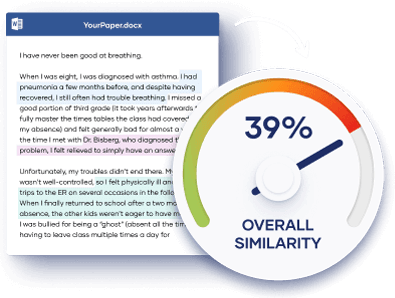
Depending on the tool, these sources may include websites, published articles, academic papers, and previously submitted documents. When the software finds similar text, it highlights the relevant passages and may display links to matching sources.
Students can use plagiarism checkers to review essays, research papers, dissertations, reports, and other academic assignments.
However, a plagiarism checker does not automatically determine whether a student has committed plagiarism. A matching passage may come from a properly cited quotation, a common phrase, or a reference list. Students must review the results and decide whether they need to revise the text or improve their citations.
A similarity score also does not guarantee that an assignment is original. Some copied passages may remain undetected if the tool cannot access the relevant sources.
Best Free Plagiarism Checker for Students
Several online tools offer plagiarism detection features that students can use without paying. However, their free features, database coverage, and reporting options differ.
The following tools are worth considering based on their general purpose and intended use.
1. Grammarly Plagiarism Checker
Grammarly is widely used by students to improve grammar, spelling, clarity, and sentence structure. Its plagiarism detection feature can help identify passages that resemble existing online content.
The tool is useful for students who want to improve the overall quality of their academic writing while reviewing potential originality issues.
Key features include:
Grammar and spelling suggestions, writing clarity recommendations, and plagiarism detection through its paid writing plans.
One important limitation is that plagiarism checking is not generally available as a full feature in Grammarly’s free plan. Students looking for a completely free plagiarism report should consider this before choosing it.
Grammarly may be a suitable option for students who want a broader writing assistant and are willing to pay for additional features.
2. Quetext
Quetext is an online plagiarism checker designed to help writers identify similarities between their work and existing content.
Students can paste text into the tool and review highlighted passages that may require further attention. Its interface is designed to make similarity results relatively easy to understand.
Key features include:
Text similarity detection, highlighted matching passages, and reports that help users review potential originality issues.
Quetext offers limited free plagiarism checking, but usage allowances and available features may change. Students should check the current limits before submitting a lengthy assignment.
The tool may work well for short essays, paragraphs, and selected sections of a research paper. Students who need to check large documents may require a paid plan.
3. SmallSEOTools Plagiarism Checker
SmallSEOTools provides a browser based plagiarism checker that allows users to paste text or upload supported documents.
Its straightforward interface makes it accessible to students who need to check an assignment without installing software.
Key features include:
Text comparison, highlighted matching content, document upload options, and plagiarism reports.
The free version may impose word limits or other restrictions. Students checking long essays may need to divide their work into smaller sections.
SmallSEOTools can be useful for an initial review of an assignment. However, its results should not be treated as a complete assessment of academic originality because source coverage and detection accuracy can vary.
4. DupliChecker
DupliChecker is an online tool that helps users identify potentially duplicated content. It is suitable for students who want a quick way to review written material before submitting an assignment.
Users can generally paste text into the checker and examine the results through a web browser.
Key features include:
Plagiarism detection, text comparison, and reports that identify potentially matching passages.
The free version has usage limits that may depend on the selected feature and current service terms.
DupliChecker can be helpful for checking short assignments, introductions, conclusions, and individual sections of longer papers.
Students should still compare the highlighted passages with their original sources and ensure that borrowed ideas receive appropriate citations.
5. Search Engine Based Manual Checking
Students do not always need a dedicated plagiarism checker to investigate a suspicious passage. Search engines can provide a useful manual alternative for checking specific sentences.
To use this method, copy a distinctive sentence from an assignment and place it inside quotation marks in a search engine. The search results may reveal websites containing the same wording.
This approach is especially useful when a student wants to check whether a particular sentence closely resembles an online source.
However, manual checking has important limitations. It does not automatically examine an entire document, calculate a comprehensive similarity score, or search every academic database.
It works best as a supplementary method rather than a complete replacement for plagiarism detection software.
Comparison of Free Plagiarism Checkers
The following table summarizes the main differences between these options.
| Tool | Main purpose | Free access | Best suited for |
|---|---|---|---|
| Grammarly | Writing improvement and plagiarism detection | Grammar tools are free, but full plagiarism checking generally requires payment | Students seeking broader writing support |
| Quetext | Plagiarism detection and similarity reports | Limited free checking | Short assignments and selected passages |
| SmallSEOTools | Online plagiarism detection | Free checking with possible limits | Quick checks of student assignments |
| DupliChecker | Duplicate content detection | Free checking with possible limits | Essays and shorter documents |
| Search engines | Manual phrase matching | Free | Checking specific sentences |
Free access does not necessarily mean unlimited use. Word limits, report details, supported file types, and other features can change over time.
Students should confirm the available features before relying on any tool for an important academic submission.
How to Choose the Best Free Plagiarism Checker
The best free plagiarism checker for students is not necessarily the one with the highest advertised accuracy or the most features. It is the one that meets the student’s needs and provides useful results within the available budget.
Read also: Best Free Online Text Case Converter: Uppercase, Lowercase
Check the Word Limit
Some tools allow only a limited number of words per scan. This can be inconvenient when checking a dissertation, research paper, or lengthy assignment.
Before choosing a tool, check whether it can handle the full document or whether you must review separate sections.
If you divide an assignment into smaller parts, remember to check the entire document for repeated content and consistent citation practices.
Consider Database Coverage
A plagiarism checker can identify only the sources it can access and compare against.
Some tools focus mainly on publicly available web pages, while others may include academic publications or institutional document collections.
For university assignments, coverage of scholarly sources can be particularly important. A tool that checks public websites alone may miss similarities with journal articles, books, or student papers that are not publicly accessible.
Review the Quality of Reports
A useful plagiarism report should identify matching passages clearly and provide enough information to investigate the original sources.
Look for tools that make it easy to distinguish between exact matches, similar wording, and properly quoted material.
A percentage alone is not sufficient. Detailed results help students understand why a passage was flagged and whether any changes are necessary.
Protect Your Academic Work
Privacy is an important consideration when using free online plagiarism checkers.
Some services may store uploaded documents or use submitted content according to their privacy policies. Others may retain information for purposes connected with their services.
Before uploading an unpublished thesis, research paper, or confidential assignment, review the tool’s privacy policy and document retention practices.
Avoid uploading sensitive research or personal information to a service unless you understand how it handles submitted material.
Check University Requirements
Some schools and universities require students to use a specific plagiarism detection system. Others provide access to institutional tools through a learning management system.
If your institution requires a particular checker, use that system whenever possible. It may compare assignments against sources or student submissions that are unavailable to public tools.
A free online checker can still be useful for an initial review, but it may not produce the same results as your university’s system.
How to Check an Assignment for Plagiarism
Checking an assignment involves more than pasting text into a website and reading the final percentage. Students should use the results to improve their writing and verify that they have acknowledged their sources correctly.
Step 1: Prepare your document.
Finish your main draft and ensure that the document contains the text you intend to submit. Include quotations and citations so that you can review how they affect the results.
Step 2: Choose a suitable plagiarism checker.
Select a tool based on your document length, available free features, source coverage, and privacy requirements.
Step 3: Run the plagiarism scan.
Paste your text into the checker or upload your document if the tool supports that option. Wait for the comparison process to finish.
Step 4: Review the highlighted passages.
Examine each matching passage and identify the source when one is provided. Determine whether the similarity comes from a direct quotation, a common expression, a properly cited statement, or wording that needs revision.
Step 5: Correct citation problems.
Add citations where necessary. If you use the exact words of another author, place them in quotation marks or format them as a block quotation when required by your citation style.
Step 6: Improve paraphrased content.
When paraphrasing, express the original idea in your own words and sentence structure. Include a citation because changing the wording does not remove the need to acknowledge the original source.
Step 7: Review the assignment again.
After making corrections, check the document for remaining citation issues, repeated passages, and accidental copying.
This process helps students use plagiarism detection as part of responsible academic writing rather than simply trying to achieve a low similarity score.
How to Avoid Plagiarism in Academic Writing
Using a plagiarism checker can help identify potential problems, but developing good research and writing habits is more effective in the long term.
First, record the details of every source you consult. Keep track of authors, publication dates, titles, and page numbers where available. This makes it easier to prepare accurate references.
Second, distinguish between direct quotations and paraphrased information in your notes. Mark copied text clearly so that you do not accidentally include it in your assignment as your own writing.
Third, cite ideas as well as direct quotations when required by your academic citation style. Information does not need to be copied word for word to require acknowledgment.
Fourth, write your own analysis. Use sources to support your argument, but explain what the evidence means and how it relates to your research question.
Finally, follow your institution’s rules on academic integrity and permitted use of artificial intelligence tools. Requirements may differ between courses and universities.
These practices help students produce original work, support their arguments with reliable evidence, and reduce the risk of accidental plagiarism.
Frequently Asked Questions
1. What is the best free plagiarism checker for students?
SmallSEOTools and DupliChecker are options for students seeking free online plagiarism checks. Quetext also offers limited free checking. The best choice depends on word limits, source coverage, privacy, and the level of detail provided in the report.
2. Can I check plagiarism for free online?
Yes. Several online tools offer free plagiarism detection with usage limits. You can also search for exact phrases manually. However, free tools may not provide access to extensive academic databases or detailed reports.
3. Is a free plagiarism checker accurate?
Accuracy varies between tools. Results depend on the sources available to the software, its comparison methods, and the type of content being checked. No plagiarism checker can guarantee that every instance of copied content will be detected.
4. What is a good plagiarism percentage for students?
There is no universal acceptable plagiarism percentage. Universities set their own expectations, and a similarity score measures matching text rather than automatically proving plagiarism. Students should review the highlighted passages and follow their institution’s academic integrity rules.
5. Can a plagiarism checker detect paraphrasing?
Some tools can identify similarities between paraphrased passages and existing sources, but their ability to detect rewritten content varies. Even when a paraphrase is not flagged, the original source must still be cited when required.
6. Is it safe to upload assignments to free plagiarism checkers?
Safety depends on the service’s privacy and document retention policies. Before uploading an assignment, check whether the provider stores submitted documents, how it uses them, and whether it shares them with other parties. For confidential academic work, consider using a checker approved by your institution.